Layers
History
Layers
History
Open a PSD file and edit its layers
Open a PSD locally with layers, masks, and live editable text, then save back as a PSD free.
How to use it
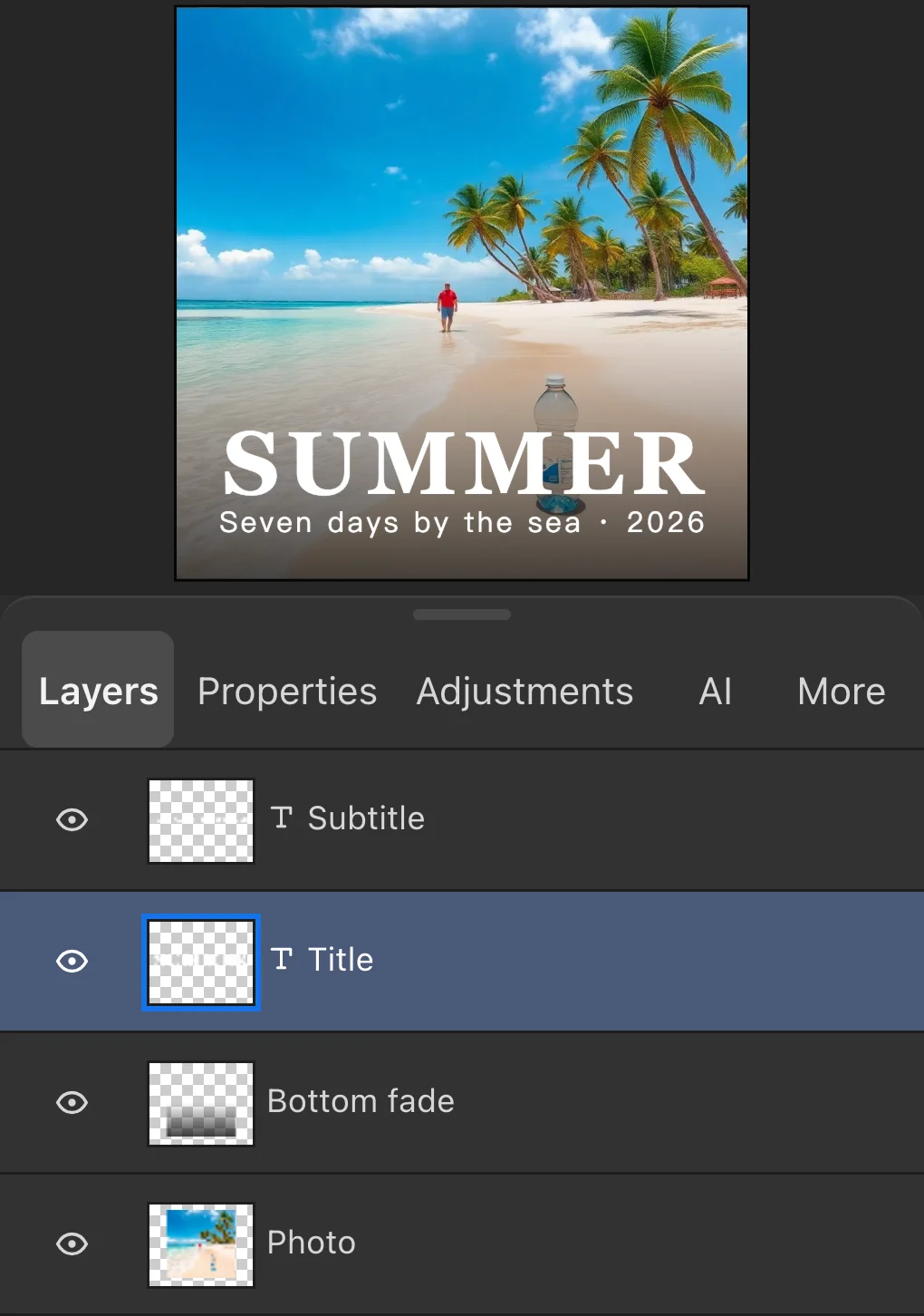
Photopip opens PSD files in the browser and keeps the layers: groups, masks, text, adjustment layers, layer styles and embedded smart objects stay editable. Change what you need, then save back to PSD or export a PNG or JPG. The file is read on your computer, not uploaded.
- Click Open a PSD file, or drag the .psd onto the page. 16-bit and CMYK files open too; a note tells you what was converted.
- Browse the Layers panel (F7): toggle visibility, open groups, double-click a text layer to change the words, click a mask thumbnail to paint on it.
- Choose File > Save As and pick PSD (*.PSD;*.PDD;*.PSDT). In Chrome and Edge the file is then written back in place with Ctrl+S (Windows) or Command+S (macOS); Safari and Firefox download a copy each time.
- For a flat image, choose File > Export > Export As, or File > Export > Quick Export as PNG.
- How can I open a PSD file without Photoshop?
- Open it in Photopip: click Open a PSD file above, or drag the file onto the page. Pixel layers, groups, 27 blend modes, layer and vector masks, clipping masks, 13 kinds of adjustment layer, layer styles, text, shapes and embedded smart objects all open as editable layers. Nothing is uploaded; the file is parsed in the browser tab.
- What opens differently from the original app?
- 16- and 32-bit files are edited in 8 bits per channel; an embedded RGB or grayscale color profile is converted to sRGB on opening, while CMYK is displayed through an approximate press model because CMYK profiles aren't read; Lab is shown as sRGB. Linked smart objects (files stored outside the PSD), the file's own annotations and slices are skipped. When the layer data can't be read, the flattened composite opens instead and a note says so.
- Will my edits survive a round trip?
- Layers, groups, masks, adjustment layers, layer styles, text and embedded smart objects are written as standard PSD records, plus a flattened preview for apps that don't read layers. 16-bit RGB files are written back as 16-bit; CMYK and grayscale files keep their mode. Every build is checked against two independent PSD libraries rather than the original app, so keep your original until you have opened the result.
- Is my PSD uploaded?
- No. Reading, rendering and saving happen in the browser tab; there is no server step. PSB (large document format) files open with partial support. A PSD or PSB larger than 16,384 pixels on a side or 100 megapixels in total is refused with a note, because a layered file can't be scaled down to fit. On an iPhone or iPad the limit is about 16.7 megapixels.
Updated 2026-11-26
More toolsSharpenAI photo editorRaw adjustmentsRestore old photoFlip imagePassport photoRemove peopleRemove text
Open a PSD file and edit its layers
Open a PSD locally with layers, masks, and live editable text, then save back as a PSD free.
How to use it
Photopip opens PSD files in the browser and keeps the layers: groups, masks, text, adjustment layers, layer styles and embedded smart objects stay editable. Change what you need, then save back to PSD or export a PNG or JPG. The file is read on your computer, not uploaded.
- Click Open a PSD file, or drag the .psd onto the page. 16-bit and CMYK files open too; a note tells you what was converted.
- Browse the Layers panel (F7): toggle visibility, open groups, double-click a text layer to change the words, click a mask thumbnail to paint on it.
- Choose File > Save As and pick PSD (*.PSD;*.PDD;*.PSDT). In Chrome and Edge the file is then written back in place with Ctrl+S (Windows) or Command+S (macOS); Safari and Firefox download a copy each time.
- For a flat image, choose File > Export > Export As, or File > Export > Quick Export as PNG.
- How can I open a PSD file without Photoshop?
- Open it in Photopip: click Open a PSD file above, or drag the file onto the page. Pixel layers, groups, 27 blend modes, layer and vector masks, clipping masks, 13 kinds of adjustment layer, layer styles, text, shapes and embedded smart objects all open as editable layers. Nothing is uploaded; the file is parsed in the browser tab.
- What opens differently from the original app?
- 16- and 32-bit files are edited in 8 bits per channel; an embedded RGB or grayscale color profile is converted to sRGB on opening, while CMYK is displayed through an approximate press model because CMYK profiles aren't read; Lab is shown as sRGB. Linked smart objects (files stored outside the PSD), the file's own annotations and slices are skipped. When the layer data can't be read, the flattened composite opens instead and a note says so.
- Will my edits survive a round trip?
- Layers, groups, masks, adjustment layers, layer styles, text and embedded smart objects are written as standard PSD records, plus a flattened preview for apps that don't read layers. 16-bit RGB files are written back as 16-bit; CMYK and grayscale files keep their mode. Every build is checked against two independent PSD libraries rather than the original app, so keep your original until you have opened the result.
- Is my PSD uploaded?
- No. Reading, rendering and saving happen in the browser tab; there is no server step. PSB (large document format) files open with partial support. A PSD or PSB larger than 16,384 pixels on a side or 100 megapixels in total is refused with a note, because a layered file can't be scaled down to fit. On an iPhone or iPad the limit is about 16.7 megapixels.
Updated 2026-11-26
More toolsSharpenAI photo editorRaw adjustmentsRestore old photoFlip imagePassport photoRemove peopleRemove text