Layers
History
Layers
History
Remove text from a screenshot
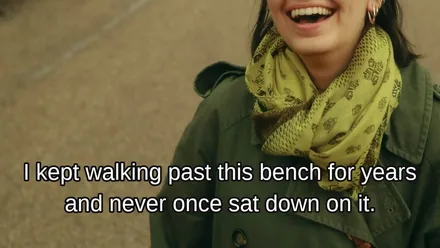
Erase subtitles or captions on a screenshot and download the cleaned image.

FreeNo sign-up
How to use it
Choose a screenshot and Photopip finds the lines of text, then fills them from the picture around them. On a paused video frame that means the subtitles or captions. Over a flat color the gap takes that color, on your device; over people, scenery or video noise, which is what most paused frames have, the area around the line goes to an inpainting model on our server. The fill goes straight into the picture, so you can touch it up with the Remove tool or undo it. This page handles still screenshots, not video files.
- Click Choose a screenshot (on a computer you can also drop one on the page). On a phone, pause the video, take a screenshot, then pick it from your photos.
- Wait while the lines are found and filled; a 1920 × 1080 frame takes a few seconds. The first run takes a few extra seconds to get ready.
- Click Download JPG (or PNG, matching the screenshot; Save JPG on an iPhone). "-no-text" is added to the file name.
- To remove the subtitles but keep other text, such as a sign in the shot: click Open in Editor (on a computer, close the card with ✕ at its top right), drag the Rectangular Marquee Tool (M) around the subtitle lines, open Window > Properties (or switch from Simple to Essentials), and click Remove Text. Only the selection is filled.
| Details | |
|---|---|
| Opens | PNG, JPG and WEBP screenshots: phone, desktop or a frame grabbed from a player |
| Fills | Over flat color or a gradient, from the edges of the gap; over people, scenery or video noise, with an inpainting model on our server (windows up to 1536 px) |
| Limit & where | One screenshot at a time; on a computer, text detection runs in your browser at 1280 px on the long side (on a phone or tablet, on our server); only the area around busy lines is uploaded, and that copy is deleted automatically within an hour |
One screenshot at a time; video files are not processed. A long subtitle over a face or fine texture can come back a little soft: paint over it with the Remove tool (J). A subtitle on a semi-transparent dark band loses its words but keeps the band. Tiny interface text in a 4K screenshot can be skipped, because detection runs at 1280 px on the long side. Every line of text the detector finds is removed, lettering in a logo or watermark included; to keep something, select only the subtitles first (step 4).
- Can it remove subtitles from a video?
- No. This page handles one screenshot; removing subtitles from a whole video means doing every frame, which is a different kind of tool. To keep one moment, pause, take a screenshot and remove the subtitles here.
- Why does the fill look soft in some places?
- A paused frame usually has a face, a street or video grain under the subtitles, so the area around them is sent to an inpainting model on our server. A long line over fine detail can come back a little soft; paint over it with the Remove tool (J).
- The words are gone but the dark band behind them is still there. Why?
- The detector finds the letters, not the band, so only the letters are filled. To remove the band too, close the card (✕), drag the Rectangular Marquee Tool (M) over the whole band, open Window > Properties (hidden in the Simple workspace), and click Remove Text.
- Can I clean frames from someone else's video?
- Use your own footage or material you have permission to edit.
Updated 2026-11-03
Remove text from a screenshot
Erase subtitles or captions on a screenshot and download the cleaned image.
FreeNo sign-up
How to use it
Choose a screenshot and Photopip finds the lines of text, then fills them from the picture around them. On a paused video frame that means the subtitles or captions. Over a flat color the gap takes that color, on your device; over people, scenery or video noise, which is what most paused frames have, the area around the line goes to an inpainting model on our server. The fill goes straight into the picture, so you can touch it up with the Remove tool or undo it. This page handles still screenshots, not video files.
- Click Choose a screenshot (on a computer you can also drop one on the page). On a phone, pause the video, take a screenshot, then pick it from your photos.
- Wait while the lines are found and filled; a 1920 × 1080 frame takes a few seconds. The first run takes a few extra seconds to get ready.
- Click Download JPG (or PNG, matching the screenshot; Save JPG on an iPhone). "-no-text" is added to the file name.
- To remove the subtitles but keep other text, such as a sign in the shot: click Open in Editor (on a computer, close the card with ✕ at its top right), drag the Rectangular Marquee Tool (M) around the subtitle lines, open Window > Properties (or switch from Simple to Essentials), and click Remove Text. Only the selection is filled.
| Details | |
|---|---|
| Opens | PNG, JPG and WEBP screenshots: phone, desktop or a frame grabbed from a player |
| Fills | Over flat color or a gradient, from the edges of the gap; over people, scenery or video noise, with an inpainting model on our server (windows up to 1536 px) |
| Limit & where | One screenshot at a time; on a computer, text detection runs in your browser at 1280 px on the long side (on a phone or tablet, on our server); only the area around busy lines is uploaded, and that copy is deleted automatically within an hour |
One screenshot at a time; video files are not processed. A long subtitle over a face or fine texture can come back a little soft: paint over it with the Remove tool (J). A subtitle on a semi-transparent dark band loses its words but keeps the band. Tiny interface text in a 4K screenshot can be skipped, because detection runs at 1280 px on the long side. Every line of text the detector finds is removed, lettering in a logo or watermark included; to keep something, select only the subtitles first (step 4).
- Can it remove subtitles from a video?
- No. This page handles one screenshot; removing subtitles from a whole video means doing every frame, which is a different kind of tool. To keep one moment, pause, take a screenshot and remove the subtitles here.
- Why does the fill look soft in some places?
- A paused frame usually has a face, a street or video grain under the subtitles, so the area around them is sent to an inpainting model on our server. A long line over fine detail can come back a little soft; paint over it with the Remove tool (J).
- The words are gone but the dark band behind them is still there. Why?
- The detector finds the letters, not the band, so only the letters are filled. To remove the band too, close the card (✕), drag the Rectangular Marquee Tool (M) over the whole band, open Window > Properties (hidden in the Simple workspace), and click Remove Text.
- Can I clean frames from someone else's video?
- Use your own footage or material you have permission to edit.
Updated 2026-11-03